Wednesday, January 3, 2024

Dockcase Explorer M.2 SSD Enclosure - Next Level High Tech Enclosure


Unboxing the Dockcase Explorer Edition M.2 SSD Enclosure


Introduction

Today, we're diving into an exciting Kickstarter project that takes M.2 SSD enclosures to the next level, along with USB Type-C hubs. Meet the Dockcase Explorer Edition M.2 SSD enclosure – a game-changer boasting faster data transfer speeds, robust hardware protection, and a unique built-in display monitoring feature.


Exploring Innovative Features

Let's kick off by exploring the innovative features that set the Dockcase Explorer apart from the rest. I'll be testing its data transfer performance, comparing it to a traditional legacy enclosure. Stick around for the in-depth review.


The Evolution of Storage

Legacy hard drives are nearly extinct, and we've transitioned to using SATA SSDs and the latest ultra-high-speed M.2 NVME SSDs. While these advancements bring faster data transfer, one crucial aspect often overlooked is the health of the SSD. Despite their lightning speeds, SSDs have a limited lifespan and can degrade over time.

Unveiling the Design

Upon unboxing, you'll find the enclosure, a braided 10 Gbps USB Type-C to Type-C cable, a screwdriver, a spare SSD screw, and a user manual. The enclosure itself boasts a design featuring aluminum for effective heat dissipation, a tempered glass surface, and a groundbreaking LCD health monitoring screen.


Easy Installation Process

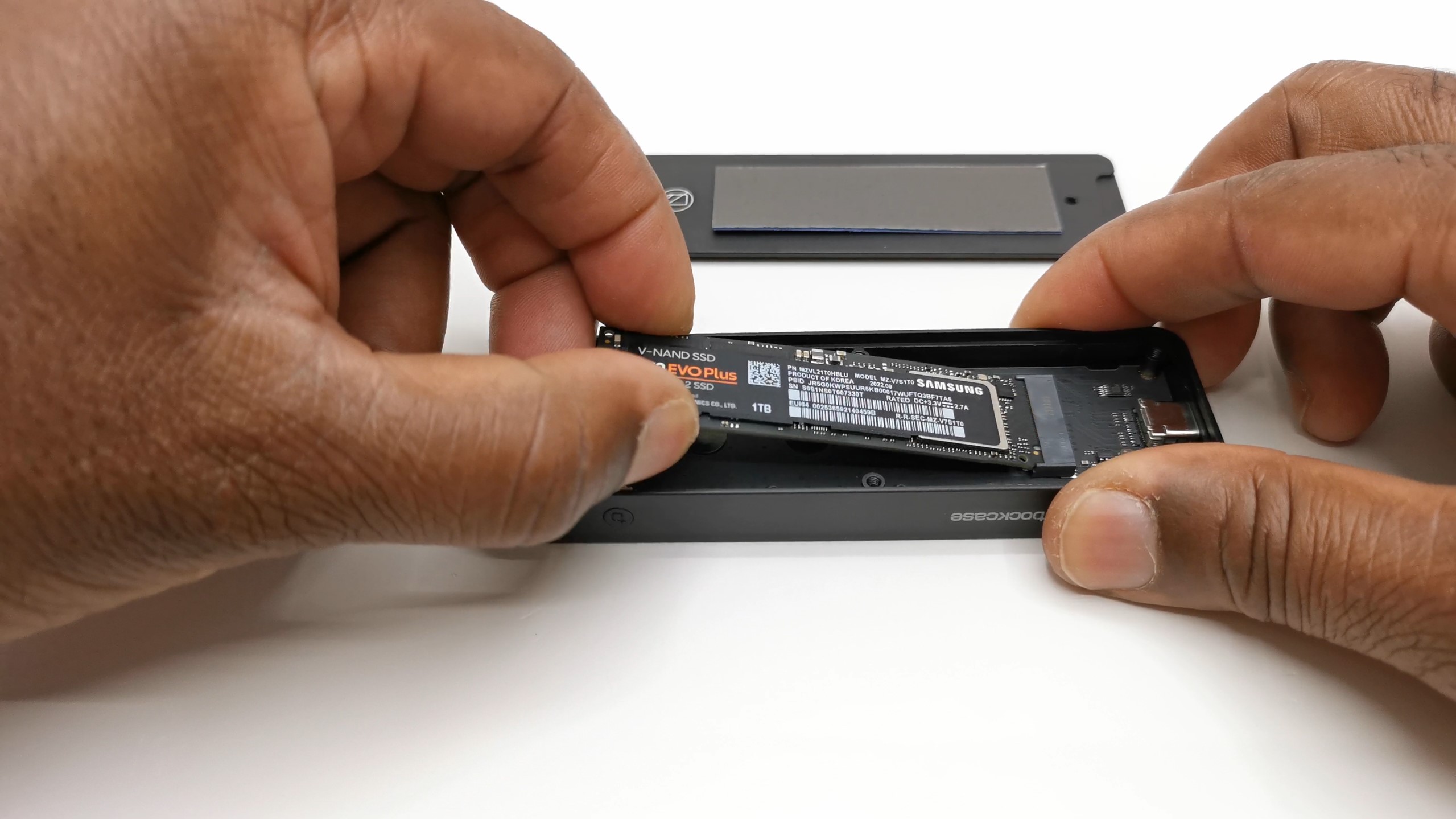
Installing your SSD is a breeze. Simply remove the back panel screw, secure the SSD with the provided screw, place it in the designated slot, secure it further based on its size, peel off the thin plastic covering the heat pad, and reinstall the back panel.


Monitoring Features and Performance Test

For this review, I'm using a 1TB Samsung Evo 970 Plus NVME M.2 SSD. Now, let's delve into the monitoring features of the Dockcase Explorer Edition.


Built-in LCD Display

The standout feature is the built-in LCD display, offering hardware protection and monitoring. Upon plugging it in, the display boots up, detecting the inserted SSD and allowing your device to recognize it. The display shows Power Loss Protection (PLP), SSD type, health status, and USB port detection, complete with color indicators.


Navigation and Menus

Navigating through menus involves a combination of long presses, double presses, single presses, and timeouts. The menus include SSD information, About Me, settings for read-only mode and screen saver timer, hardware monitoring, and manual ejection options.

Smart File Transfer Detection

A unique feature is the smart file transfer detection and monitoring, providing real-time read and write speeds, data sessions, and total data transferred over the drive's lifespan during file transfers.


Performance Comparison

Now, let's compare the Dockcase Explorer's performance against a legacy enclosure. The Dockcase boasts a sequential read speed of 1058 MB/s and a write speed of 1043 MB/s – consistent with other enclosures using the Realtek 9210 chipset.


Conclusion

In conclusion, the Dockcase Explorer Edition is not just a sleek and high-tech M.2 enclosure; it delivers on both performance and SSD protection. Available on Amazon in black, pink, and silver, you can currently grab a $16 coupon off the original $89.99 price tag.

So, if you're in the market for a cutting-edge M.2 SSD enclosure that combines style, performance, and advanced monitoring features, the Dockcase Explorer Edition is worth considering.

Friday, November 24, 2023

Vankyo Vista T4 Ultra Short Throw 4K Laser Projector - Wow!!! Breathtaki...


Hey, everyone! Welcome back to TV Box Stop, the go-to channel for top-notch reviews on TV boxes and accessories. Today, I'm excited to dive into the world of projectors and share my experience with the VankyoVista T4, an ultra-short throw 4K laser projector that promises to be an all-in-one solution to your entertainment needs.

Unboxing the Vankyo Vista T4

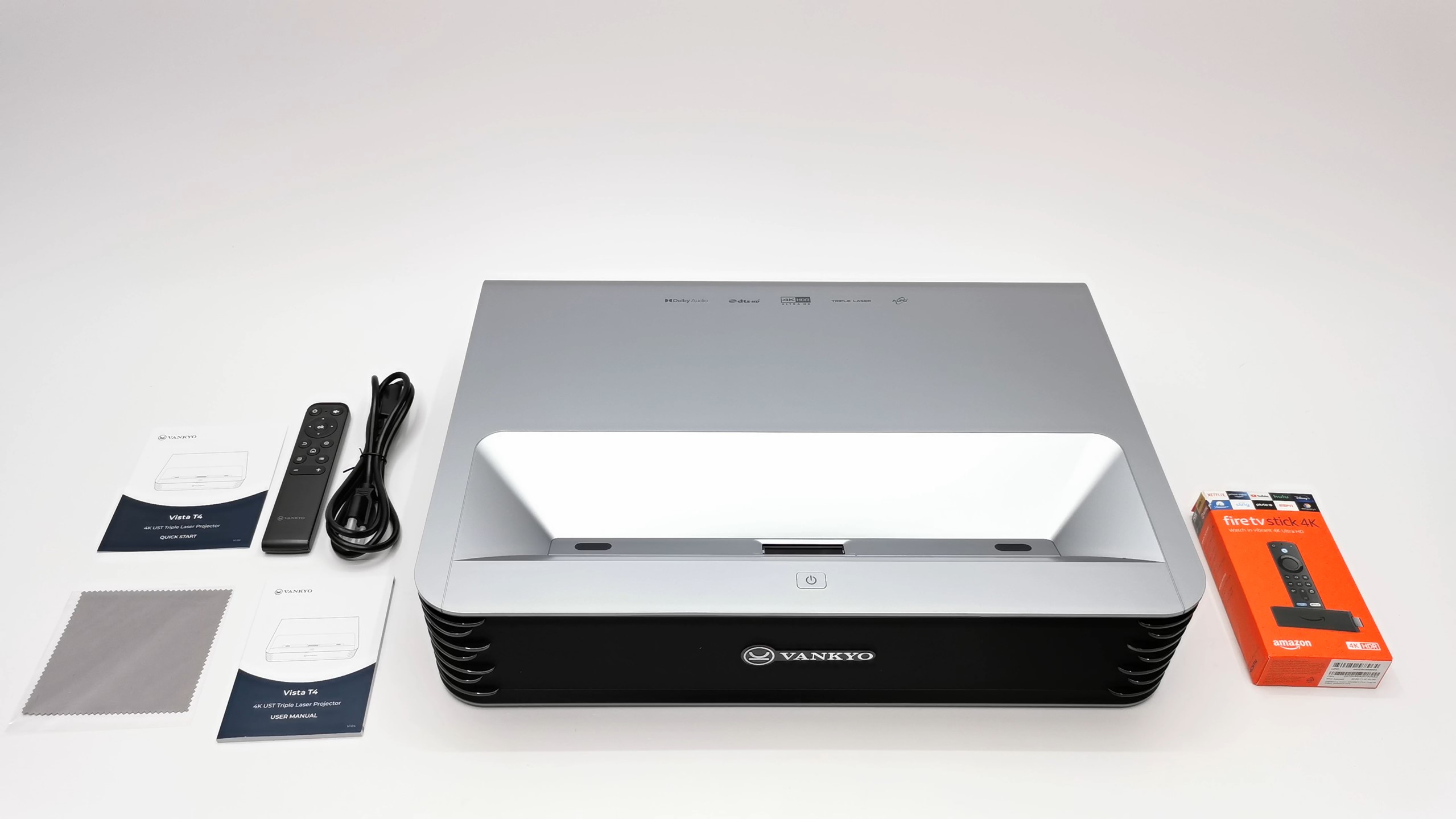
Let's kick things off by exploring what comes in the box. The Vankyo Vista T4 takes center stage, weighing in at a substantial 72 lbs. Alongside it, you'll discover a special bonus – the latest Amazon Fire TV Stick 4K model. The package also includes a Bluetooth remote, a three-pin AC power cable, a lint-free lens cleaning cloth, a user manual, and a quick start guide. It's a comprehensive package that sets the stage for what's to come.

Tech Specs Deep Dive

Before we dive into the hands-on experience, let's take a closer look at the Vankyo Vista T4's specifications:


  • Display: Boasting a native resolution of 3840 by 2160p with 8.3 million pixels.
  • Brightness: A formidable 2100 ANSI lumens.
  • Contrast Ratio: A crisp 3000:1.
  • Throw Ratio: An impressive 0.233:1.
  • Display Type: DLP with a triple laser ALPD light source.
  • Maximum Display Size: A whopping 150 inches.
  • Audio: Equipped with a pair of 60W internal speakers.
  • Smart Features: Android operating system with AV1, Dolby Audio, and DTS audio video playback capabilities, Bluetooth connectivity, 3D display capability, and more.

Design and Connectivity

Moving on to design, the Vankyo Vista T4 measures 21 ¼ inches wide, 14 ¾ inches long, and 4 ½ inches tall. The top showcases its laser projector lens, sensors, and power button, while the front features the Vankyo logo, LED power light, and concealed dual 60W internal speakers. Cooling vents, adjustment wheels, and a variety of ports, including HDMI, USB, audio, and Ethernet, are spread across its sides and base.


Setting Up and Navigating the Interface

The startup process, featuring a Vankyo splash screen and a brief wizard, takes a mere 19 seconds from an off position. Once up and running, the main menu beckons, offering source inputs, file management, online manual access, local applications, settings, and support options. The settings menu provides a plethora of customization, from image adjustments to keystone correction and audio settings.

Hidden Gems in the Android Operating System

Now, let's uncover some of the Vankyo Vista T4's hidden gems. Running on an Android 9 operating system, it allows for connectivity with USB controllers, enabling mouse and keyboard usage. Although lacking the full Google Play Store, it supports sideloading APKs, including app stores. While the interface is somewhat plain, its versatility shines through.


Performance and Entertainment Options

With or without the bundled Amazon Fire TV Stick 4K, the Vankyo Vista T4 offers a range of entertainment options. From watching YouTube videos to mirroring Android and iOS devices, its capabilities are vast. Compatibility with Google Chromecast enhances its versatility, providing a seamless experience for streaming high-quality content.


A Visual Feast: 4K Display and Surround Sound

The Vankyo Vista T4 lives up to its promise of a visual feast. Supporting 4K HDR 10+, AV1, and Dolby Vision videos, it delivers outstanding display quality directly from external storage. Surround sound capabilities impress, though with a minor hiccup with Dolby TrueHD. The projector's gaming performance, especially with 3D games, is flicker-free and captivating.


Under the Hood: System Information

Peering under the hood, we find that the Vankyo Vista T4 is powered by a MediaTek mainboard with 3GB of DDR4 RAM and 32GB of internal storage. Its CPU, a MediaTek M7642 quad-core cortex A73 processor, and Mali G52 GPU contribute to its robust performance. Dual-band 5 GHz Wi-Fi, Android 9 Pie, and Bluetooth 5.0 round out its impressive specs.


The Verdict

In wrapping up this extensive review, the Vankyo Vista T4 stands out as a powerhouse in the projector arena. Boasting a triple laser display, robust internal speakers, and an array of features, it redefines home entertainment. While its price may be a deterrent for some, the investment proves worthwhile for those seeking top-tier display quality and versatility.

Final Thoughts

Bid farewell to your flatscreen TV – the Vankyo Vista T4 is here to stay. Its exceptional display quality and immersive features make it a standout choice for entertainment enthusiasts. I've thoroughly enjoyed my time with this projector, and if you're in the market for a cinematic experience at home, the Vankyo Vista T4 is a solid investment.

Saturday, November 18, 2023

Innoview 18 Inch 2.5K QHD Portable Monitor Review


I'm excited to share with you my hands-on experience with the Innoview 18-inch portable monitor. Innoview has recently sent us their latest creation, a portable monitor boasting a 2.5K QHD display on an 18-inch A+ ISP panel. In this Innoview 18-inch portable monitor review, I'll take you through the unboxing, explore its design and features, connect it to different devices for display quality testing, and even throw in a side-by-side comparison with a similar-sized monitor. Stick around; there's a lot to uncover!

Unboxing the Innoview 18-Inch Portable Monitor

So, what's inside the box? When you make your purchase, you'll find the 18-inch portable monitor, a USB Type-C to USB Type-C display and data cable, an HDMI to mini HDMI display cable, another USB Type-C to USB Type-C cable (specifically for the power adapter), a 12.1.67 A USB Type-C power adapter, a cleaning cloth, and a user manual. Innoview certainly doesn't skimp on accessories.


Design and Specifications

Let's dive into the aesthetics and specs of this portable monitor. The display measures exactly 18 inches diagonally with a ¼ inch bezel along the top and sides and a one-inch bezel at its base. On the left side, you'll find a pair of USB Type-C display power ports and a mini HDMI display port. The right side hosts the power button, a menu control rocker, and a headphone jack. At the back, there are built-in speakers and VESA mounting screw holes. The sturdy, non-detachable metal kickstand and anti-skid rubber feet add to its stability.

In terms of technical specifications, the monitor boasts a maximum resolution of 2560 x 1600, a 2.5K display, 500 nits of brightness, a professional 100% DCI-P3 wide color gamut, and a 60 Hz maximum refresh rate. The kickstand can flip 180° for easy VESA mounting in both horizontal and vertical portrait modes.


Functionality for Work and Entertainment

Now, how practical is this portable monitor for work and entertainment? Its 18-inch size makes it larger than your average laptop or notebook screen, making it ideal for use as a second display in extended mode. It's great for Mini PCs, Android boxes, and other streaming devices, providing flexibility in landscape and portrait modes. Whether you're into desktop work, content creation, or enjoying TikTok and YouTube shorts, this monitor has you covered. Plus, it can serve as a dedicated monitor for your security camera system's DVR or NVR.


User-Friendly Settings and Controls

Getting into the nitty-gritty, the on-screen display (OSD) menu is easily accessible. A simple push on the control rocker brings up the OSD, allowing you to navigate through brightness and contrast settings, color settings, audio settings, and more. You'll find options like FreeSync, HDR, and the ability to manually switch between input sources. It's user-friendly and intuitive.


Side-by-Side Comparison

Promised and delivered – here's a side-by-side comparison with a similar competing model. Both monitors share the same OSD menu, allowing for an equal setup. Playing a 4K HDR AV1 video, the Innoview shines. It's not only brighter but also displays sharper visuals. While the color gamut might not be significantly better, the lumens definitely stand out.


Final Verdict

Wrapping up this Innoview 18-inch portable monitor review, I can confidently recommend it for those seeking a high-quality widescreen portable monitor. Its crystal-clear display and excellent color gamut make it a standout choice. The built-in speakers, though loud, could use a bit more bass. These 18-inch portable monitors are hitting the market just in time for the holiday Black Friday sales event. If you're interested, check out the special link in the description along with an additional 5% coupon for an exclusive deal.

By using the provided link, you not only secure a great deal but also directly support this channel, enabling me to bring you more reviews. Thanks in advance for your support! Don't forget to like and subscribe, and stay tuned for more exciting videos. Until next time, happy viewing!


Friday, November 17, 2023

Beelink Mini S12 Pro - Fascinating Boost Speed Must See!!!


Exploring the Beelink Mini S12 Pro: A Comprehensive Review


Hey everyone, I recently had the chance to delve into the world of Mini PCs with the Beelink Mini S12 Pro, and I'm excited to share my findings with you. This compact powerhouse runs on an Intel Alder Lake 12Gen N100 CPU, boasting 16 GB of DDR4 RAM and a 512 GB storage capacity. Join me as I take you through the unboxing, design features, and performance benchmarks of this intriguing Mini PC.


Unboxing and Design:


Upon opening the box, I discovered the Mini S12 Pro alongside essential accessories, including two HDMI cables, a 12V 3A DC power supply, a bracket for monitor mounting, and a user manual. The design showcases a sleek plastic shell with the Beelink logo, featuring dual HDMI 2.0 ports, a 1 GB LAN port, USB 3.0 ports, a headphone jack, and more. The Mini S12 Pro also comes with a handy SATA expandable storage compartment.


Hardware Overview:


Under the hood, the Mini S12 Pro boasts a 512 GB NVME 2280 M.2 SSD, a 16 GB DDR4 RAM module, and an Intel UHD graphics APU. Surprisingly, despite its seemingly low base clock speed of 800 MHz, this Mini PC exhibits efficient performance. The boost clock speed can reach up to 3.3 GHz under intensive activities, making it a snappy and responsive system.


Operating System and Performance:


The Mini S12 Pro comes pre-installed with Windows 11, providing a seamless user experience. The Intel N100 processor, coupled with 16 GB of DDR4 RAM, ensures smooth multitasking and quick responsiveness. AIDA64 and CPU-Z confirm the hardware specifications, while the Realtek ALC 897 audio adapter and Intel Wi-Fi 6 AX 101 provide excellent audio and connectivity options.


Multimedia Capabilities:


The Mini S12 Pro impresses with its multimedia capabilities, supporting a 4K 2160p resolution with HDR display. It offers dual monitor extended display, wireless display features, and an array of surround sound audio formats, including Dolby Atmos and DTS X. The APU's graphics features Vulkan and OpenGL 4.6, enhancing the gaming experience.


Benchmark Results:


Benchmarks reveal the Mini S12 Pro's prowess, with impressive scores in RAM transfer speed, M.2 SSD read and write speeds, network speeds, and CPU and GPU performance. 3DMark time spy test showcases its gaming capabilities, achieving around 30 fps in games like Apex Legends at 1440p.


Video Editing and Gaming:


While video editing with 4K clips may not be its strongest suit, the Mini S12 Pro excels in retro gaming. With the Retroarch platform, it effortlessly handles Nintendo 64 and PlayStation games. However, modern games like Destiny 2 on Steam may struggle, indicating limitations in high-performance gaming.


Alternative Operating Systems:


Experimenting with alternative operating systems, I encountered some challenges. Android x86 failed due to compatibility issues, and FydeOS lagged behind with an outdated Android subsystem. Yet, using a custom Chrome OS build provided access to Google Play Store and Android 11, delivering a unique experience with high-performance Android gaming.


Conclusion:


In summary, the Beelink Mini S12 Pro stands out as a high-performance budget Mini PC, offering versatility and power for its price point. Priced around $179, it presents an attractive option for those seeking a compact yet capable computing solution. As we approach Black Friday, now might be the perfect time to explore this Mini PC's features.


Tuesday, October 10, 2023

KinHank X6 Cheap Fully Netflix Certified Android TV Box


Exploring the KinHank X6 Certified Android TV Box: A Detailed Review


Hello, everyone! I'm Nick from TV Box Stop, and I'm excited to bring you another TV box review. Today, we're diving into the world of KinHank with their latest offering, the KinHank X6. KinHank is renowned for its retro gaming consoles, but the X6 marks their entry into the realm of certified Android TV models. These certified devices have their own unique appeal, especially for those who enjoy paid subscription services like Netflix and Prime Video. In this review, we'll explore the features of the KinHank X6 and determine if it's worth adding to your entertainment setup. So, stick around as we dive into the details!

Unboxing the KinHank X6


Let's start by taking a look at what's inside the box when you purchase the KinHank X6:

The X6 model itself.
A Bluetooth voice remote with Google Assistant functionality.
An HDMI cable.
A 12V 1A DC power adapter.
A user guide to help you get started.
Design and Connectivity

The X6 boasts a sleek design with a plastic body featuring the X6 branding on the top. When it comes to connectivity, this device doesn't disappoint:

HDMI 2.1 port.
Gigabit LAN port.
Two USB 2.0 ports.
A microSD card reader.
DC power socket.
The front panel includes an LED power light, while the bottom features four anti-skid rubber feet and ventilation holes to keep the device cool during operation.

Initial Setup and Android TV OS


Upon first startup, you'll need to go through the Google Assistant first startup wizard, which involves pairing the Bluetooth remote and logging into your Google account. If you're new to Android TV OS, it's essential to note that it's distinct from the mobile version of Android. Android TV OS is designed to run on TVs and is navigated using a directional pad, unlike the mobile version intended for touchscreen devices.

Firmware Features


Here's a breakdown of the key firmware features of the KinHank X6:

Supports up to 4K 2160p @ 59.94 Hz resolution.
HDR display with always-on mode (no adaptive HDR feature).
Options to disable HDR by adjusting color space settings.
Screen position settings to fit your display frame.
HDMI CEC feature.
Surround sound feature (can be enabled or disabled).
Multilingual support (52 languages).
Built-in Chromecast and Google Assistant functionality.
Accessing Apps and Games

It's important to understand that the Google Play Store on Android TV is not the same as the mobile version. Apps and games in the TV version are optimized for larger screens and navigated using a directional pad and an OK button. While you may find some mobile apps, many are not available for Android TV.

Streaming Experience


One of the standout features of the KinHank X6 is its ability to run paid subscription services like Netflix, Prime Video, Disney Plus, and more in HD and 4K. This capability is thanks to its Google certification and HDCP (High-bandwidth Digital Content Protection) support. With Google Widevine Level 1 and HDCP 2.3 protection, it can stream services like Netflix in high-quality HD and 4K with surround sound.

System and Hardware Information


Here's a look at the essential system and hardware information of the KinHank X6:

Manufacturer: HAKO.
Amlogic chipset with 4GB of DDR4 RAM and 32GB of internal storage.
Bluetooth version 5.0.
CPU: Amlogic S905Y4-B, a quad-core Cortex A35 processor clocked at 2.0 GHz.
GPU: Mali G31 with Open GL version 3.2 support.
Supports 5 GHz Wi-Fi band.
Runs on Android 11 TV OS (not rooted).
GPU with Vulkan support API version 1.1.
Supports various video and audio codecs, including 4K HDR AV1 videos and Dolby Atmos, EAC3, and DTS HD audio decoders.
YouTube Video Playback

YouTube videos can be played up to 4K resolution at 60 Hz with HDR. However, it's important to adjust the color space settings for HDR to function correctly.

Gaming Performance and Other Applications


The KinHank X6 delivers decent gaming performance, but there are limitations when it comes to accessing saved game data through Google Play Games. Additionally, updating Google Play services may not be straightforward.

Users of the downloader application and the Kodi media player application will find that they work without any issues.

Benchmarks

Let's take a quick look at some benchmark results for the KinHank X6:


RAM copy speed: 4020 MB/s.
Internal storage read speed: 116 MB/s.
Internal storage write speed: 74 MB/s.
Geekbench 5 CPU benchmark scores: 115 single-core, 420 multicore.
3DMark graphics benchmark score: 379 (Slingshot Extreme tests).
Antutu benchmark score: 102502.
Conclusion

In summary, the KinHank X6 is a solid choice for those looking for an affordable certified Android TV box that excels at streaming paid subscription services in HD and 4K, with support for Dolby Atmos. It also integrates seamlessly with Google Assistant and smart home devices.

However, it's important to note that the X6 is not the mobile version of Android, so certain limitations, such as the absence of a navigation bar and limited access to mobile apps in the Play Store, apply. Despite these drawbacks, the X6 offers excellent value for its price.

Tuesday, October 3, 2023

Ugoos AM8 Amlogic S928X TV Box - OMG!!! Insane Dolby Vision Capabilities


Exploring the Ugoos AM8: A Game-Changing Android TV Box


Hey there, TV Box enthusiasts! Welcome back to TV Box Stop. Today, I've got some exciting news for you. Ugoos has just unleashed a powerhouse with their latest release, the Ugoos AM8, powered by the cutting-edge Amlogic S928X penta-core hardware. You won't believe the incredible features packed into this model, and I can't wait to share them all with you. So, without further ado, let's dive right into it.


In the box, you'll find:

  • The Ugoos AM8 model itself.
  • A Ugoos Bluetooth air mouse voice remote.
  • A high-quality HDMI cable.
  • A 12V 1.6A 20W DC power supply.
  • A braided USB Type-C to USB Type-C cable for power supply.
  • Dual antennas.
  • A user manual.

Design-wise, Ugoos has maintained their signature metal housing, complete with an LED indicator at the top, right at the center of the Ugoos logo. The I/O ports include a USB Type-C port for power, HDMI 2.1, USB Type-C OTG, Gigabit LAN, optical audio, auxiliary, 3 USB 3.0 ports, and a microSD card reader. The dual antennas are cleverly positioned for optimal signal strength. The front features a single IR sensor, while the base has antiskid rubber feet, recovery, maskrom buttons, and ventilation holes. Inside, you'll find a massive 3½ inch heavy-duty heatsink, optimized for cooling, and the onboard memory is powered by a CR2032 lithium coin cell battery. This particular model comes with 4GB of RAM and 32GB of internal storage.


Upon startup, you'll be greeted with the standard Ugoos animation, followed by the option to choose between two launchers. Launcher 3, which I'll be using for this review, is designed to be navigated with an air mouse remote or a PC mouse, featuring long-click menu pop-ups, drag-and-drop shortcuts, and a navigation bar with access to recent apps and system controls. Under the "About" section, you'll find that it runs on Android 11, giving you access to developer options by tapping rapidly on the build info.

Now, let's talk about the unique firmware features that set Ugoos apart from the competition:

  • 4K 2160p@60 Hz display (8K at 30 Hz maximum).
  • Dolby Vision display feature, including options for HDR policy and color mode.
  • Enhanced HDR to SDR feature.
  • Frame buffer size adjustment for sharper UI.
  • Display orientation options, including portrait, reverse portrait, and reverse landscape.
  • Option to force orientation.
  • UI font size and density adjustments.
  • Auto framerate switching for better audio-video sync.
  • Audio options for HDMI and optical audio, along with surround sound audio choices.
  • HDMI CEC options.
  • Button manager for keymapping.
  • Mouse pointer options for UI navigation and touchscreen functionality for touchscreen games.
  • USB control features, including speed control, sleep mode, and USB file transfer.
  • Panels and interface customization options.
  • Voice input application selection.
  • UI animation speed adjustment.
  • Power LED behavior control.
  • Power key definition, sleep timer, and CPU scale governor settings.
  • Client and Samba server features for network setup.
  • Root switch via the Magisk application.
  • Support for 54 languages.
  • Access to default core Android settings.

Now, let's delve into the hardware specs of the Ugoos AM8. This particular model boasts 4GB of LPDDR4 RAM and 32GB of internal storage, with a Pro model soon to be released featuring 4GB of RAM and 64GB of internal storage. Its Bluetooth version is 5.3 BLE, making it compatible with Smart home devices and wearables. The CPU is the Amlogic S928X-J 12nm processor, featuring a penta-core setup with a quad-core cortex A55 running at 2.0 GHz and a single-core cortex A76 clocked at 1.8 GHz. The GPU is the ARM Mali G57 7nm dual-core processor, perfect for gaming with support for Vulkan 1.1 and Open GL ES 3.2.

For network connectivity, it has the AP6276P (Wi-Fi 6) dual-band adapter, supporting 2.4GHz, 5GHz, and 5.850GHz frequencies. The AM8 runs on Android 11, providing access to the Google Play Store, although it's limited to 32-bit apps and games. Streaming enthusiasts should be aware that it lacks the necessary digital rights to run Netflix and similar services in HD or 4K. The DRM info shows it only has Google Widevine security level 3, which restricts streaming to 480p.

If you desire root access, it's easily attainable through the Magisk application. Wireless screen mirroring using the Airscreen app works seamlessly. YouTube fans will appreciate the ability to watch videos in up to 4K 2160p@60 Hz with HDR support. The most groundbreaking feature, however, is the support for Dolby Vision on self-hosted videos and streaming applications. Ugoos has made this long-awaited dream a reality, allowing users to enjoy Dolby Vision and Dolby Atmos simultaneously. The AM8 also excels in surround sound audio, supporting formats like Dolby Atmos, Dolby Digital+, Dolby Surround, Dolby TrueHD, DTS HD Master Audio, and DTS-X.

To test its thermal performance, the AM8 impressively maintains low temperatures even during gaming. Its massive heatsink effectively keeps the chipset cool, with temperatures staying below 65°C. However, some games and benchmark tests may experience random crashes or frame rate and resolution switches, even with auto frame rate switching turned off.


In terms of benchmarks, the AM8 scores impressively across the board. Its RAM copy speed reaches 17,802 MB/s, while internal storage boasts read speeds of 203 MB/s and write speeds of 71 MB/s. Connecting an M.2 SSD via the Type-C port yields read speeds of 23 MB/s and write speeds of 39 MB/s. In Wi-Fi speed tests, it performs admirably on both 5GHz and 2.4GHz bands, with gigabit LAN delivering maximum speeds.

The Geekbench 5 CPU benchmark scores 418 in single-core and 769 in multicore performance. The GPU performance is decent but may need firmware updates to address occasional crashes and frame rate issues. In the Antutu benchmark, the AM8 achieves a score of 227,726, placing it among the top-performing TV boxes.

In conclusion, the Ugoos AM8 is a game-changer in the Android TV box arena. With its impressive hardware, unique firmware features, and groundbreaking Dolby Vision capability, it's set to redefine your entertainment experience. The only drawback is its lack of certification for streaming services like Netflix in HD or 4K. Nevertheless, if you're looking for the best Android box in 2023, the Ugoos AM8 with its mobile Android version and feature-rich package should be at the top of your list.